GST E-Invoice Online in India

Simplify your GST compliance with fast, error-free e-invoice generation through RegisterKaro. Get real-time IRN, seamless portal integration, and expert-backed support to avoid penalties.

4.7/5 on TrustPilot

0 Cr+

Refunds delivered last year

0 M

User Trust Us

Let’s connect constellations

Let’s align our constellations! Reach out and let the magic of collaboration illuminate our skies.

Comprehensive Business Solutions

We provide end-to-end services to help your business thrive in today’s
competitive market

Fast Processing

Quick turnaround time with efficient
processing of all documentation

Secure & Compliant

All services are fully compliant with
government regulations

Expert Team

Experienced professionals with years of industry expertise

24/7 Support

Round-the-clock customer support for all your queries

What is GST E-Invoice?

GST E-Invoice does not mean creating invoices on the GST portal. Instead, it’s about reporting already generated invoices to a government-designated portal, the Invoice Registration Portal (IRP), for validation and registration. When you generate an invoice in your accounting or billing software, the details are sent to the IRP.

You can keep generating invoices through your existing billing or ERP system without any major changes to your workflow. The only extra step is to send the invoice details in a prescribed JSON format to the IRP for authentication.

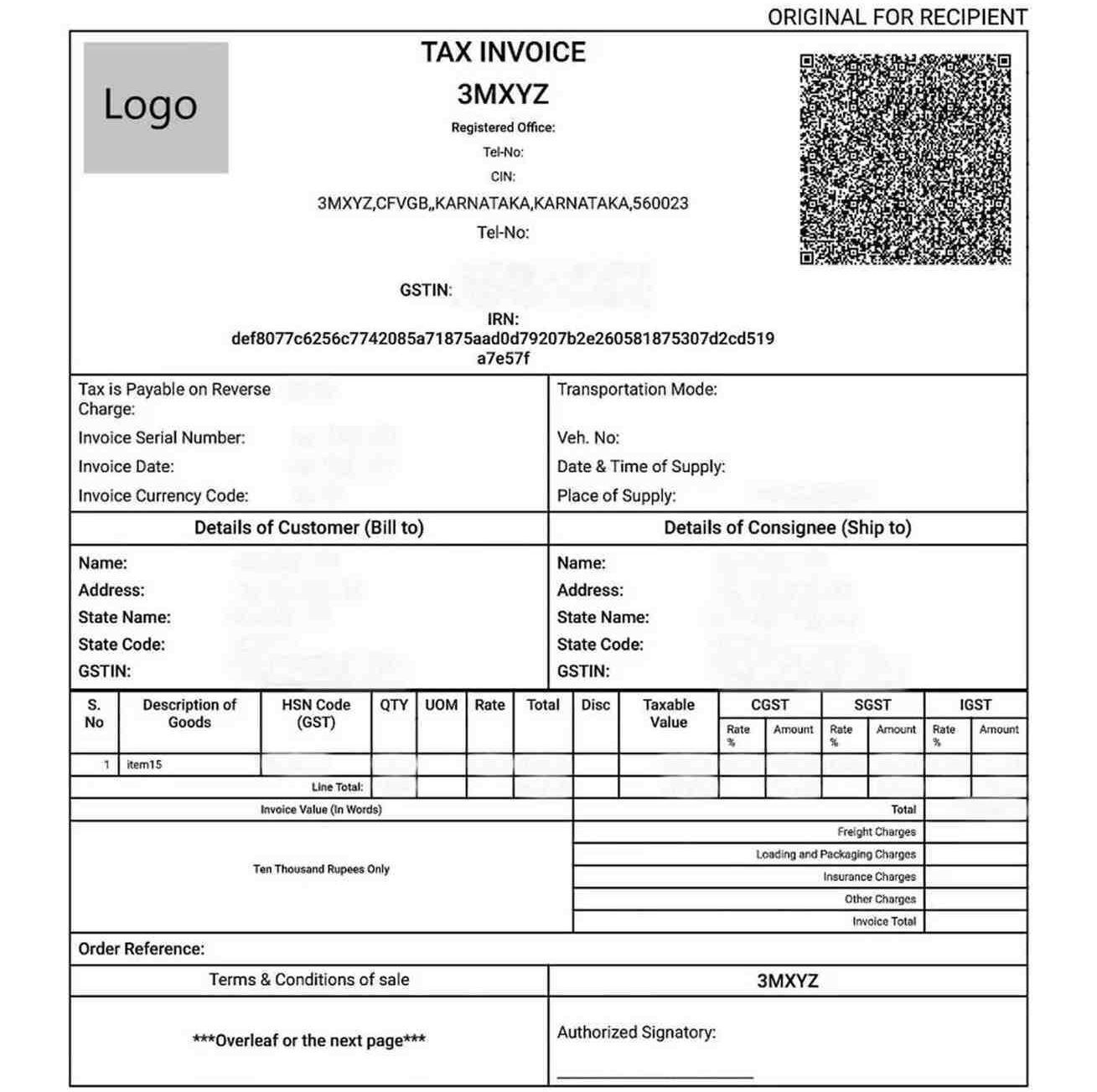
The IRP checks the data, creates a unique Invoice Reference Number (IRN), digitally signs the invoice, and attaches a QR code to it. Once the IRP verifies and signs the invoice, it becomes a valid GST e-invoice. This process ensures standardized data and facilitates real-time B2B reporting to the GST system.

Why Was E-Invoicing Introduced Under GST in India?

The shift to e-invoicing under GST was driven by several key goals:

  • Curb Tax Evasion: By ensuring real-time reporting of invoices, it becomes much harder for businesses to create fake invoices or manipulate sales figures, thus reducing tax evasion.
  • Automate Compliance: It automates the process of filing GST returns, especially GSTR-1, as the data from GST E-Invoice is directly populated, reducing manual errors and saving time.
  • Improve ITC Matching: With real-time invoice data, the system can more accurately match Input Tax Credit (ITC) between buyers and sellers, minimizing disputes and discrepancies.
  • Standardize Data: It brings uniformity to invoice data across different businesses and software, making data analysis and reconciliation much easier for both taxpayers and tax authorities.
  • Eliminate Fake Invoices: The unique IRN and digital signature make it almost impossible to generate or use fake invoices.
  • Facilitates Faster GST Refunds: With accurate, real-time reporting, e-invoicing speeds up the verification process, leading to quicker GST refunds.

Key E-Invoice Words You Must Know

To navigate the GST E-Invoice portal and process, knowing these terms is essential:

  • IRP (Invoice Registration Portal)

This is the central government portal where taxpayers upload their invoice details for validation. It’s the gateway for generating your GST E-Invoice. Currently, there are multiple IRPs operated by the NIC (National Informatics Centre) and other government-approved private entities.

  • IRN (Invoice Reference Number)

This is a unique 64-character hash generated by the IRP for each valid invoice. It’s based on the supplier’s GSTIN, invoice number, financial year, and document type, ensuring its uniqueness. No two invoices can have the same IRN.

  • QR Code

A Quick Response Code is a machine-readable barcode generated by the IRP and embedded in the GST E-Invoice. It contains key invoice details like GSTIN of the supplier and the recipient, IRN, invoice value, and date, allowing for quick verification by tax officers and buyers.

  • JSON (JavaScript Object Notation)

This is the standardized digital format in which invoice data must be prepared and uploaded to the IRP. It ensures uniformity and ease of data exchange between different systems.
GST E-Invoice Applicability: Who Needs to Generate GST E-Invoice?

The applicability of GST E-Invoice depends on a business’s aggregate turnover. The government has implemented e-invoicing in phases, progressively bringing more businesses under its ambit.

Currently, e-invoicing is mandatory for all GST-registered persons (excluding those specifically exempted) whose aggregate turnover in any preceding financial year from 2017-18 onwards exceeds Rs. 5 Crore. This applies PAN-wise, meaning if the total turnover across all GSTINs registered under the same PAN exceeds this limit, then GST e-invoice is applicable for all branches of that entity.

It’s crucial to track aggregate turnover carefully to determine your e-invoice applicability. If you need assistance, our experts can help.

Types of GST Invoices

While GST E-Invoice is a system for reporting, it applies to certain types of documents you generate:

Type of GST Invoice Purpose Applicable Scenario Key Features
Tax Invoice Issued to charge GST on the supply of goods or services Regular B2B supplies or B2C sales and exports Includes GSTIN, invoice number, HSN/SAC code, tax rate, tax amount, and buyer details
Bill of Supply Issued when GST is not applicable or charged Composition scheme dealers or exempt/non-GST goods Does not include tax amount; used instead of tax invoice
Receipt Voucher Issued on receipt of advance payment from a customer When an advance payment is received for future supply Contains the amount received, applicable tax, and GSTIN of the recipient
Refund Voucher Issued when an advance payment is received, but the supply is not made Order cancellation or non-supply after advance payment Links to receipt voucher; includes refund details and tax reversal if applicable
Payment Voucher Issued by the recipient for reverse charge payments When paying for goods/services liable under the reverse charge Contains details of the supplier, tax rate, and amount paid
Credit Note Issued when the invoice amount is reduced post-issuance Discounts, returns, or corrections in the original invoice Adjusts taxable value and tax liability downward
Debit Note Issued when the invoice amount is increased post-issuance Price increases or undercharged tax corrections Increases taxable value and tax liability upward
ISD Invoice Used by an Input Service Distributor (ISD) to distribute Input Tax Credit (ITC) for services to its branches The head office distributes input tax credit to different branches Includes details of ITC distributed, GSTIN of the recipient unit

How to Calculate Your Aggregate Turnover for E-Invoicing?

Calculating your aggregate turnover for e-invoicing under GST is crucial to determining if the rules apply to you. Here’s how it’s done:

Formula:

Aggregate Turnover = (Taxable Supplies + Exempt Supplies + Exports + Inter-State Supplies) – (Taxes like GST, IGST, CGST, SGST + Inward Supplies under RCM)

Component Included in Turnover Amount (Rs.)
Taxable Outward Supplies Yes 80,00,000
Exempt Outward Supplies Yes 5,00,000
Export of Goods or Services Yes 10,00,000
Inter-State Branch Transfers Yes 5,00,000
Subtotal 1,00,00,000
Less: GST Components (CGST, SGST, IGST, UTGST, Cess) No 10,00,000
Aggregate Turnover 90,00,000
Inward Supplies under RCM No
Non-Taxable Inward Supplies No
Duties and Taxes other than GST No

This calculation is done on an all-India basis (across all GSTINs under the same PAN) and excludes GST and cess.

What Transactions Need an E-Invoice?

GST E-Invoice is mandatory for the following types of transactions, provided the supplier is required to generate e-invoices (i.e., their aggregate turnover exceeds the threshold):

  • Business-to-Business (B2B) Supplies: All invoices issued by a registered person to another registered person.
  • Exports (with or without payment of IGST): This includes direct exports and supplies to SEZ units.
  • Supplies to SEZ Units: Even if they are located in India, supplies to Special Economic Zone (SEZ) units are considered exports for e-invoicing under GST.
  • Deemed Exports: Specific categories of supplies are treated as exports even if goods don’t physically leave the country.
  • B2B transactions where the Reverse Charge Mechanism (RCM) is applicable: The supplier, if mandated, still needs to generate an e-invoice.
  • Credit Notes and Debit Notes: Issued for B2B transactions and exports by applicable taxpayers.

Who is Exempt from E-Invoicing?

Certain categories of registered persons are exempt from e-invoicing under GST, regardless of their turnover. These include:

  • Special Economic Zone (SEZ) Units (though supplies to SEZ units by a liable supplier require an e-invoice)
  • Insurers
  • Banking companies, including Non-Banking Financial Companies (NBFCs)
  • Financial institutions
  • Goods Transport Agencies (GTA) supply services concerning the transportation of goods by road in a goods carriage
  • Suppliers of passenger transport services
  • Suppliers of services by way of admission to the exhibition of cinematograph films in multiplex screens
  • Government Departments
  • Local Authorities

How to Generate a GST E-Invoice?

Generating a GST E-Invoice involves a structured process that begins from your billing system and ends with the IRP. Here’s how to generate an e-invoice in the GST portal (or rather, via the IRP):

Step 1: GSTIN Enablement and IRP Registration

First, ensure your GSTIN is enabled for e-invoicing under GST. This typically involves providing your GSTIN, setting up credentials, and verifying your details. This is your gateway to the GST E-Invoice portal.

Step 2: Choose Your Method to Communicate with the IRP

You have several options for sending your invoice data to the IRP:

  • API-based Integration: This is ideal for large businesses with high volumes of invoices. Your ERP (Enterprise Resource Planning) or accounting software directly integrates with the IRP’s API (Application Programming Interface), allowing for seamless, automated, and real-time generation of IRNs. This is efficient for constant e-invoicing under GST.
  • Offline Utility: The IRP provides an offline utility (like an Excel-based tool) where you can manually enter or import your invoice data. This tool then generates a JSON file that you can upload to the IRP. This is suitable for businesses with a moderate volume of invoices.
  • Web-based and Mobile App: The IRP also offers a web-based portal where you can manually enter invoice details one by one. The mobile app option is either limited or not officially available from NIC; it is only offered through GST Suvidha Providers (GSPs).

Step 3: Create and Upload the Invoice Data

You continue to create your invoices in your own accounting or billing software. Ensure all mandatory fields for an e-invoice are accurately captured. Once ready, your software (if integrated via API) or you (if using an offline utility or web portal) will prepare the invoice data in the prescribed JSON format and upload it to the IRP.

Step 4: IRP’s Validation and Return

The IRP receives your invoice data (JSON file). It performs several validation checks, including:

  • Checking for duplicate IRNs (to ensure a unique invoice)
  • Validating mandatory fields and data format
  • Verifying the GSTINs of the supplier and recipient.

If all checks pass, the IRP generates a unique 64-character IRN, digitally signs the invoice, and creates a QR Code.

Step 5: Issuing the Final, Valid E-Invoice

The IRP returns the digitally signed e-invoice (with the IRN and QR Code embedded) to your accounting software or through the portal. You then issue this validated GST E-Invoice to your buyer.

It’s important to note that an invoice for which e-invoicing under GST is applicable is only considered valid if it has a valid IRN and QR code.

Mandatory Fields of a GST E-Invoice

For a GST E-Invoice to be valid, it must contain specific mandatory fields, ensuring all critical information is captured. These details are reported to the IRP:

1. Document Details

  • Document Type: (e.g., Tax Invoice, Credit Note, Debit Note)
  • Document Number: Your unique invoice number
  • Document Date: Date of invoice issue

2. Supplier Information

  • Supplier’s GSTIN: Your Goods and Services Tax Identification Number
  • Supplier’s Legal Name: Your registered business name
  • Supplier’s Address: Full address including pin code, state, and country

3. Recipient (Buyer) Information

  • Recipient’s GSTIN: Buyer’s Goods and Services Tax Identification Number (if registered)
  • Recipient’s Legal Name: Buyer’s registered business name
  • Recipient’s Address: Full address including pin code, state, and country
  • Place of Supply: State where the supply is made
  • Shipping Address: If different from the recipient’s address

4. Item Details (for each product or service)

  • HSN/SAC Code: Harmonized System of Nomenclature (for goods) or Services Accounting Code (for services)
  • Item Description: Name of the good or service
  • Quantity: Number of units
  • Unit of Measurement (UQC): (e.g., KGS, NOS)
  • Unit Price: Rate per unit
  • Taxable Value: Value of the item before tax
  • GST Rate: Applicable GST percentage (e.g., 5%, 12%, 18%, 28%)
  • Tax Amounts: CGST, SGST, IGST, Cess (if applicable)

Common E-Invoicing Errors and Solutions

Some common e-invoicing errors and solutions are as follows:

Error Code Error Type Description Common Cause Solution
2150 IRN Generation Failure Invoice Reference Number not generated Incorrect data or mandatory fields missing Validate invoice format, fill all mandatory fields, and reattempt submission
9999 GSTIN Mismatch GSTIN does not match the registered details Wrong GSTIN entered or a mismatch with government records Cross-check the GSTIN on the GST portal before uploading
2154 Duplicate IRN Error Attempt to generate an IRN for the same invoice multiple times Re-submitting the same invoice without cancellation Do not re-upload without checking IRN status; cancel and reissue if needed
2155 Invalid HSN Code An incorrect or outdated HSN code was entered Typing errors or using an outdated HSN list Use the updated HSN directory from the GST portal
2156 Wrong Invoice Type Selected Selecting B2B instead of B2C or vice versa Manual selection error Review the invoice type based on the transaction and correct it before IRN generation
2157 Incorrect Document Number Format The document number format is not as per the GSTN guidelines Special characters or inconsistent formats are used Use an alphanumeric, consistent, and GST-compliant invoice number format
3029 Date Errors The invoice date does not match or is older than allowed Backdated or future-dated invoices submitted Ensure the invoice is generated and uploaded on the same or the next day as per GST norms
401 Authentication Token Expired API or portal login token expired during operation Session timeout Refresh the token or re-authenticate before retrying
2182 Error in JSON Format Technical format error in the uploaded file Improper JSON schema or syntax error Use government or GSP-approved tools to validate and generate JSON files
1001 QR Code Not Visible or Invalid QR code missing on the final invoice Improper IRN generation or file not updated Regenerate the invoice from IRP with a valid QR code

How to Cancel or Change an E-Invoice?

Once an IRN is generated for a GST E-Invoice, you cannot directly edit or modify it on the GST E-Invoice portal. The system is designed for immutability to prevent fraud.

1. The 24-Hour Cancellation Window

Please note that GST regulations allow you to cancel an e-invoice through the IRP only within 24 hours of the IRN being generated. After this period, cancellations must be handled using credit or debit notes. If you realize a mistake (like a data entry error or duplicate invoice) within this window:

  • Log in to the GST E-Invoice portal.
  • Navigate to the Cancel option.
  • Enter the Invoice Reference Number (IRN) you want to cancel.
  • Select the reason for cancellation (e.g., Duplicate or Data Entry Mistake).
  • Submit the cancellation request.

2. What Happens After 24 Hours?

If the 24-hour window for cancellation passes, you cannot cancel the e-invoice on the IRP. In such cases, you must make the necessary corrections by:

  • Issuing a Credit Note: If you need to reduce the value or cancel the supply.
  • Issuing a Debit Note: If you need to increase the value.
    These Debit/Credit Notes should then be reported in your GSTR-1, referencing the original GST E-Invoice to adjust the tax liability.

3. You Can NEVER Edit an E-Invoice

It’s critical to remember: you cannot edit an e-invoice after its IRN has been generated. The only action allowed on the IRP after generation is cancellation within 24 hours. Any required modifications after this period must be done through credit or debit notes.

The details in your GSTR-1 will automatically populate from the e-invoice data. You can edit some fields in GSTR-1 before filing to fix minor discrepancies. However, critical fields linked to the IRN, such as the invoice number and supplier/recipient GSTIN, cannot be edited.

GST E-Invoice Certificate Format

GST E-Invoice Certificate Format


A GST E-Invoice Certificate is an official document issued by the Invoice Registration Portal (IRP) under the Goods and Services Tax (GST) system. It validates a business invoice with a unique Invoice Reference Number (IRN) and a QR code, confirming real-time authentication. This certificate is mandatory for businesses that exceed the turnover threshold prescribed under GST regulations, typically ₹5 crore or more.

The certificate ensures that the invoice is compliant with government norms, timestamped, and digitally signed by the IRP, serving as a verified proof of transaction. It is a key requirement for audit readiness and seamless input tax credit claims.

How to Download the GST E-Invoice Online?

To download your GST e-invoice certificate from the IRP:

  1. Visit the official e-Invoice portal (einvoice1.gst.gov.in/).
  2. Log in using your GSTIN credentials.
  3. Navigate to the “E-Invoice History” or “Generate IRN” section.
  4. Search and select the desired invoice by IRN, invoice number, or date.
  5. Download the invoice in PDF format, which includes the IRN and QR code.

How to Check GST E-Invoice Status Online?

To check the status of a GST e-invoice:

  1. Go to the e-Invoice portal (einvoice1.gst.gov.in/).
  2. Select “Search” > “IRN” or “Invoice Reference Number Status.”
  3. Enter your IRN, invoice number, or GSTIN.
  4. The system will display the current status: Generated, Pending, Failed, or Cancelled.
  5. In case of any discrepancies or failures, consult your GST Suvidha Provider (GSP) or contact the GSTN helpdesk.

Frequently Asked Questions/Discussions

QI. Who can participate in the contest?

Anyone with a passion for writing can participate! There are no age or location restrictions unless specified in the contest rules.

Click the “Participate” button on this page, fill out the contest entry form, and submit your story under the “Story” category.

No, participation in the contest is completely free.

No, each participant can submit only one entry for this contest.

Your story should be between 800 and 1,500 words.

Yes, you can submit your story in English or Hindi.

Let’s connect constellations

Let’s align our constellations! Reach out and let the magic of collaboration illuminate our skies.

What You Get with Expert Salah

From seamless filings to proactive alerts, Expert Salah combines expert support with smart tools to simplify compliance—so you never miss a deadline or worry about paperwork again.

₹15000 /month

Base

For most businesses that want to otpimize web queries

₹15000 /month

Intro

For most businesses that want to otpimize web queries

₹15000 /month

Enterprice

For most businesses that want to otpimize web queries

₹15000 /month

Pro

For most businesses that want to otpimize web queries

WHAT OUR CLIENTS SAY

Solutions for Every Tax & Compliance Need

Scroll to Top